Introduction
Developers are known to be lazy. When you find yourself using the same set of tools over and over again to provide the same functionality, you start to wonder if there’s a way to package all the tools together into one bundle. For many years now web developers had been using some variant of LAMP, which stands for Linux, Apache, MariaDB/MySQL, and PHP. With the advent of Javascript on the client side and the server side, developers have popularized a new set of solutions: MEAN. MEAN stands for MongoDB, AngularJS, and NodeJS, all of which are used widely in the web development community. Some developers have taken it upon themselves to create a set of command-line tools and outline a uniform structure of a MEAN project. We at Stack Harbor have made it easy for you to develop a MEAN application using our turnkey development Stacks.
Accessing Your Application
Once your Stack is built, you’ll need to log into your remote machine using SSH in order to test the sample MEAN application we’ve packaged with the Stack, as well as begin developing your very own MEAN application. If you don’t already know how to use SSH, check out our detailed tutorial. Once you’ve logged into your machine using SSH, you’ll see a block of text shown in your terminal. This is called the message of the day (MOTD) and contains some logistical information regarding your Stack. If you cd into the /opt/ directory, you will see a directory called sample_application. This is the sample MEAN project we’ve packaged with your Stack. In order to run the server, cd into the directory and run grunt. This will start the ExpressJS web server on port 3000. Once the server has started, point your browser to your Stack’s public IP address on port 3000. In other words, visit http://your_stacks_ip_address:3000 You should see the following landing page:
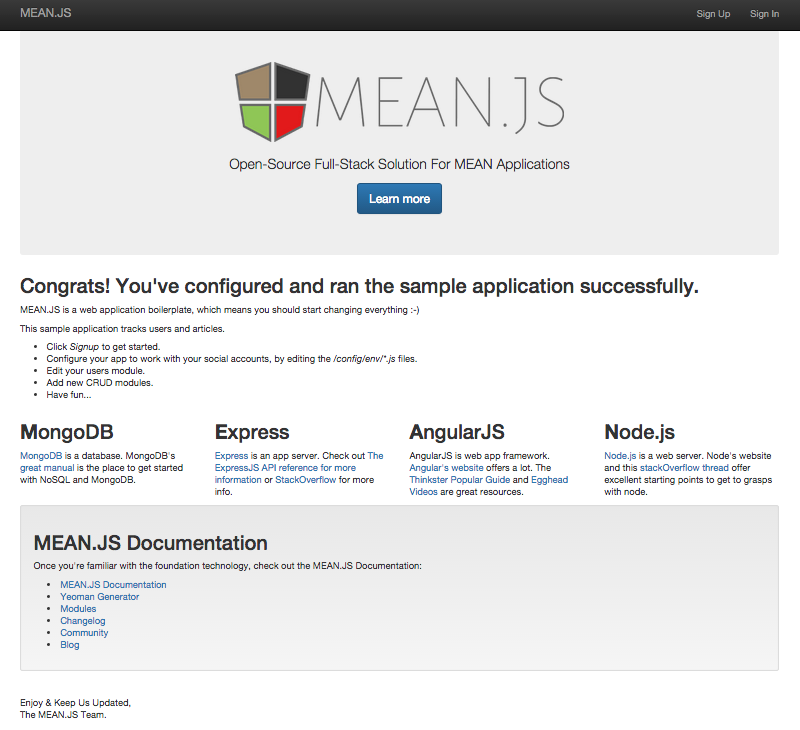
Feel free to play around with the functionality of this application to get a feel for what you can achieve with a MEAN application.
Final Words
Congratulations! You’re all set to begin developing a blazing-fast application, capable of high I/O throughput. The beauty of the MEAN Stack is that you can use Javascript from the front-end to the back-end, which allows for consistency and efficiency during development. Check out the fantastic documentation written by the folks who maintain the MEAN project for more information on how to develop your very own MEAN application. For more tutorials on various server administration and development tasks, check out our Community Section. From all of us at Stack Harbor, ahoy!